Instagram Photo Downloader
Save public post photos and carousel images individually on PC, iPhone or Android, free from a link.
What is an Instagram Photo Downloader?
A photo downloader saves the available images identified by a public post link. A carousel can return several separate photos; preview and save the ones you need on PC, iPhone or Android without capturing the Instagram interface.
Save an Instagram photo in three steps
- Open the public photo post or carousel. On iPhone or Android, open Share and choose Copy link. On PC, open the post and copy the /p/ address from the browser; copying a profile address is a different action.
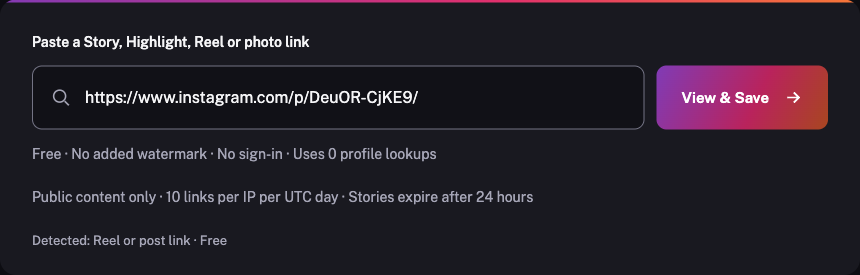
- Paste that post address above and choose View & Save. For a carousel, review the returned image items to find the photo you want.
- Download each selected photo using its image control. Check Downloads or Files, then import it into your photo library if your device requires that extra step.
How to copy a photo post link
- Open the specific public photo post in Instagram. A username or profile homepage does not identify an individual content item.
- On iPhone, open Share and choose Copy link when available. If the action is missing, open the same content in your mobile browser and copy its full address.
- Paste the complete photo post link into the free box above. Check the detected type before choosing View & Save; keep any Story's 24-hour expiry in mind.
- Open the specific public photo post in Instagram. A username or profile homepage does not identify an individual content item.
- On Android, open Share and choose Copy link when available. If the action is missing, open the same content in your mobile browser and copy its full address.
- Paste the complete photo post link into the free box above. Check the detected type before choosing View & Save; keep any Story's 24-hour expiry in mind.
- Open the specific public photo post in Instagram. A username or profile homepage does not identify an individual content item.
- Open Share and choose Copy link when available, or copy the full address of that opened item from your browser address bar.
- Paste the complete photo post link into the free box above. Check the detected type before choosing View & Save; keep any Story's 24-hour expiry in mind.
Save content for permitted use. Ask the creator before reposting.
Keep the photo, not a screenshot
- Resolve a public photo-post or carousel link without sign-in
- Show each available returned carousel image separately
- Save the source image without adding a watermark or recompressing it here
- Keep the highest returned image dimensions without artificial upscaling
Supported photo formats and image quality
Images are downloaded as the supplied source files, normally JPG. Their dimensions and compression depend on Instagram and the content source. The service does not upscale or recompress them and does not promise the creator’s original camera file.
A mixed carousel can include photos and videos. Choose an image download for a photo and the MP4 control for a video. Each item is saved separately; there is no bulk selection or ZIP export.
A post photo is different from a Story photo
A regular post does not follow the 24-hour Story lifetime, though a creator can delete, archive or restrict it. A photo shared only as a current Story needs its own Story link. Both content-link types work in this input. A download does not transfer copyright or permission to repost.
Frequently asked questions
Can I download multiple photos from one carousel?
Yes, when those photos are returned by the source. Each image has its own download control and is saved separately. Bulk selection and ZIP export are not offered.
Is this a screenshot of the Instagram post?
No. The image download streams the supplied source photo without the Instagram interface. Its dimensions and quality depend on that source file.
Why does a photo-post link also show a video?
Instagram carousels can mix photos and videos. Choose an image download for a photo or the MP4 control for a video item.
Can I recover an archived Instagram photo?
No. The photo must remain publicly available and retrievable through the source. The tool does not recover deleted, archived or private posts.