Instagram Video Downloader
Save a public Instagram video from its post link on PC, iPhone or Android, free without an account.
What is an Instagram Video Downloader?
A video downloader turns a supported public Reel, video post or available legacy video link into an individual downloadable file. It also displays video items returned inside a mixed carousel, on PC, iPhone or Android.
Copy and save an Instagram video in three steps
- Open the public video post rather than its profile. On iPhone or Android, use Share then Copy link. On PC, copy the post’s browser address; /p/, /reel/ and available /tv/ addresses identify individual media.
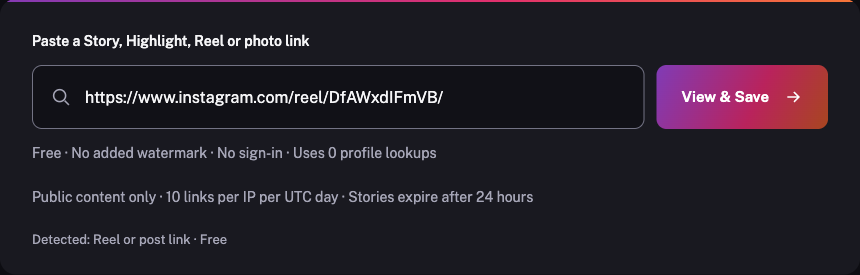
- Paste the address above and choose View & Save. If a post contains several items, locate the returned video you want to save.
- Play the preview, then choose its video download. Wait for the complete file in your browser’s Downloads list before opening it.
How to copy a video post link
- Open the specific public video post in Instagram. A username or profile homepage does not identify an individual content item.
- On iPhone, open Share and choose Copy link when available. If the action is missing, open the same content in your mobile browser and copy its full address.
- Paste the complete video post link into the free box above. Check the detected type before choosing View & Save; keep any Story's 24-hour expiry in mind.
- Open the specific public video post in Instagram. A username or profile homepage does not identify an individual content item.
- On Android, open Share and choose Copy link when available. If the action is missing, open the same content in your mobile browser and copy its full address.
- Paste the complete video post link into the free box above. Check the detected type before choosing View & Save; keep any Story's 24-hour expiry in mind.
- Open the specific public video post in Instagram. A username or profile homepage does not identify an individual content item.
- Open Share and choose Copy link when available, or copy the full address of that opened item from your browser address bar.
- Paste the complete video post link into the free box above. Check the detected type before choosing View & Save; keep any Story's 24-hour expiry in mind.
Save content for permitted use. Ask the creator before reposting.
One link for the video post you want
- Accept public Reel, post and available legacy video addresses
- Show available video items from mixed-media posts
- Save the highest returned MP4 version without recompression here
- Keep the supplied audio and optional still cover as separate downloads
Supported video formats and resolutions
MP4 saves the motion and audio supplied by the source. A separate JPG cover is a still image. The available source versions determine dimensions; the service does not upscale, convert a photo into a video or create an MP3.
Video posts and Reels use the same link workflow. An older /tv/ address works only when that public post still exists and remains retrievable. A carousel can mix photos and videos: choose the specific video item you need.
Check playback before saving
Your phone may mute playback until you enable sound. The download preserves the source encoding, so support depends on the device’s player and available storage. Network interruptions can be retried; deleted, archived or restricted videos cannot be restored by another download attempt.
Frequently asked questions
Can I download a video inside a carousel post?
The resolver displays the available items returned for that public post. Choose the video item’s download rather than an adjacent photo or cover image.
Why did I save a JPG instead of a video?
A JPG is a photo or a video’s still cover. Choose the MP4 download associated with the video item to save motion and its supplied audio.
Do old IGTV links still work?
Available public /tv/ links are accepted by the same resolver. The post must still exist and be returned by the source; the tool cannot recover a deleted or restricted video.
Can the video downloader create an MP3?
No. The service saves the supplied video file and does not offer audio extraction or file conversion.